


Overview
If a page becomes inaccessible because a JavaScript function automatically navigates away from it during page load, you can still regain access by using the developer tools and the debugger statement.
This workaround is useful when:
- the app has multiple pages, and
-
at least one other page is still accessible, such as a login or home page.
Root Cause
A page-level script or JS Object may run on load and immediately call navigateTo(), which redirects the app before you can inspect or update the code.
Workaround
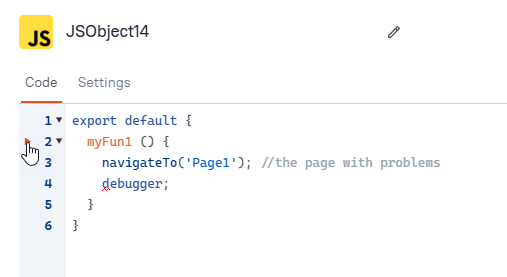
From a page that still loads correctly, create a temporary JS Object with a function that navigates to the affected page and pauses execution with a debugger statement.
Note that the execution will pause only if you have the browser developer tools open.
Use a function like this:
export default {
  myFun1() {
    navigateTo("Page1"); // Replace with the affected page name
    debugger;
  }
}
Steps
- Open any page in the app that is still working.
- Create a JS Object and add the function above.
- Open your browser's developer tools.
- Manually run the function from the JS Object.
- When execution pauses, access the affected page's resources and update the problematic JS Objects or page logic.
Result
Because navigation is triggered manually and paused in the debugger, you can reach the affected page before its normal redirect logic completes. This gives you time to identify and fix the redirecting code.
Notes
- Replace
"Page1"with the actual name of the affected page. - This is a temporary recovery method and should be removed after the issue is resolved.
- This workaround only applies if another page in the app is still accessible.
Best Practice to Prevent The Redirection Loop
To avoid getting locked out of a page during development or future debugging, use a dedicated redirect function that checks whether the app is running in Edit mode or View mode before redirecting. Appsmith provides the appsmith.mode object for this purpose.
Recommended Pattern
Use a helper JS function similar to this redirect function to prevent the redirect from happening in the edit mode of the app:
export default {
  redirect(pageName) {
    if (appsmith.mode === "EDIT") {
      return;
    }

    navigateTo(pageName);
  }
}
By preventing redirects in Edit mode, you can continue accessing and debugging pages in the editor even if redirect logic is configured on page load.
This is especially helpful during:
- early app development
- troubleshooting
- future maintenance of existing apps
Introduce this pattern early in development and use the redirect helper instead of calling navigateTo() directly in page-load flows.
Later, if you decide redirects should also run in Edit mode after all issues are resolved, you can update this function.